
Recover Deleted Messages All
The Novelty AppsCommunication
3.796.00 Reviews
- Version
- 9.9.8.2
- Installs
- 5.00M
- Age Rating
- Everyone
Screenshots
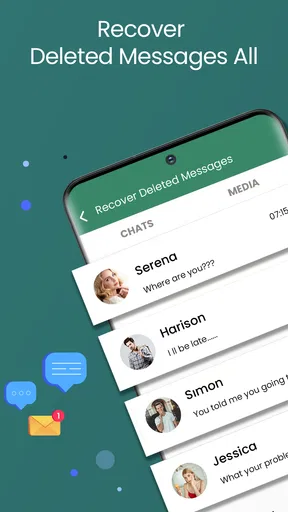

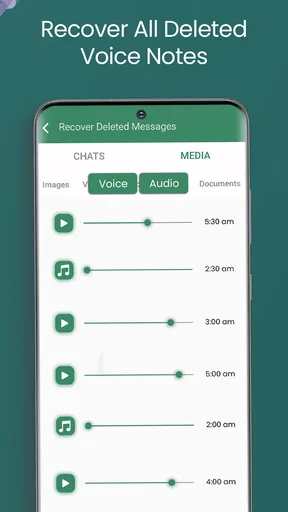
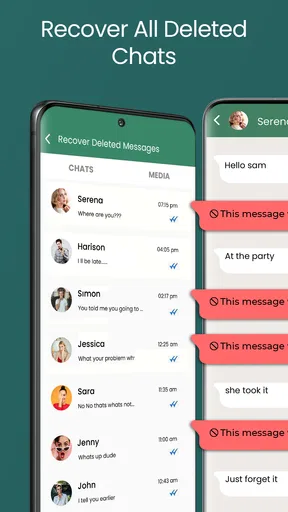




Our Review of Recover Deleted Messages All
 Analysis by Appyee
I think of Recover Deleted Messages All as a safety net you have to prepare before anything goes wrong, not a magic undo button. That difference shapes the whole experience: it may help when a message disappears after setup, but it cannot turn a phone into an archive of conversations it never captured. If you understand that boundary, the app makes more sense as a practical communication tool than as a guaranteed rescue service.
Decide what you want to protect first
Before installing, I’d identify the conversations and media that would genuinely matter to recover. Trying to preserve everything can create clutter and make it harder to find the item you need later. A useful approach is to prioritize the messaging apps you rely on for plans, addresses, work details, or family updates, then check the app’s setup carefully for those sources.
That small bit of planning is more valuable than waiting until a deletion happens. If you tend to clear notifications quickly, or share a phone with someone who often tidies message threads, setting up a recovery workflow in advance can reduce the chance of losing a useful detail. I would still keep important information somewhere durable when possible; a recovery app is a backup aid, not a substitute for saving an address or instruction you know you will need.
A realistic day-to-day use
Imagine a friend sends an address while you are commuting. You notice the notification, but you are busy and do not open the conversation. Later, the sender removes the message, and you realize you need the location for the evening. This is the kind of situation where a tool that has already been configured to capture relevant notifications may be useful. The key is that it was ready before the message disappeared; installing it after the fact will not recreate that missed history.
There is also a less dramatic but common use: recovering a voice note or media item you meant to keep, or checking a contact’s status before it is no longer available. These are convenience cases, not a reason to assume every item can always be restored. I would treat recovery as a chance to retrieve something that was captured, then save it somewhere sensible if it is important.
Make the handoff from alert to recovery useful
The app’s value depends on a chain of steps: the relevant source needs to be covered, the information has to reach the phone in a form the app can capture, and you need to know where to look when you want it back. If any link is missing, the outcome can be disappointing even if the app itself is working as intended. I’d test the workflow with a harmless message first rather than discovering its limits during an urgent moment.
That test can also show whether your everyday habits interfere with the process. For instance, if you routinely silence notifications or use a messaging app in a way that does not surface the content on your device, you should not assume a recovery tool can fill that gap. The practical lesson is to check the result, not just complete setup and presume every future message is protected.
Who will get the most from it
I can see this being most useful for someone who receives important details through several chat apps and occasionally deletes messages or misses a notification. It is also a reasonable option for people who want a simple extra layer of protection without manually copying every conversation. The Novelty Apps makes a communication app aimed at that narrow but familiar problem: keeping access to messages and related items that might otherwise slip away.
On Google Play, it has a 3.9 average from around 6,400 ratings and over 5 million installs. That suggests many people have tried it, though popularity alone does not tell me whether it will fit a particular phone or messaging routine. It is free to install, rated for Everyone, and includes optional in-app purchases ranging from $6.99 to $49.99 per item. I’d check what any paid option actually adds before spending, especially if your only need is occasional message recovery.
Where another approach may be better
If you mainly need to restore a conversation in one messaging service, I would first look at that service’s own backup and restore options. Those are usually a more direct route for a whole chat history, while this app’s appeal is its broader focus on recovered message content, voice notes, media, and contact status. The trade-off is that a notification-based safety net is not necessarily the same thing as a complete conversation backup.
For messages that matter legally, professionally, or for long-term record keeping, I would not rely on this app alone. Save key details through an appropriate export, backup, or secure note-taking method as well. And if you rarely lose messages, adding another app and maintaining its setup may be more effort than simply using the backup tools already built into the services you use.
Some practical questions are worth answering before you depend on it. Can it recover something deleted before installation? No: it needs to be prepared in advance. Does it guarantee every message or media item will be available? I would not treat it that way; capture depends on the source and the way information reaches your device. Is it worth paying for? That depends on the value of the items you need to retrieve and what the paid choice offers in the app. For occasional use, I’d start with the free experience and judge the actual workflow before considering an upgrade.
Ever accidentally deleted a message and felt that instant wave of regret? You're not alone, my friend. Enter Recover Deleted Messages All, a nifty app that promises to be the superhero we all need when it comes to lost text messages. Let me walk you through my experience with this app and see if it truly lives up to its promises.
Getting Started with Ease
First things first, downloading and installing Recover Deleted Messages All was a breeze. It's available for both Android and iOS, so no matter what side of the smartphone fence you're on, you're covered. Once installed, the app greets you with a clean and intuitive interface. Big plus for that! There's nothing worse than an app that feels like you need a degree in rocket science to navigate.
How It Works
The app essentially backs up your messages and notifications, so when that dreadful moment comes, you can simply recover what you've lost. It covers a range of messaging apps, from WhatsApp to Telegram and even Facebook Messenger. That's pretty comprehensive!
Using it is quite straightforward. You set it up to monitor the apps you want, and it does the rest. The app runs quietly in the background, so you won't even notice it's there until you need it. It's like having an insurance policy for your messages.
Performance and Reliability
Now, onto the performance. The app works seamlessly without slowing down my phone, which is a huge relief. I've tried similar apps that turned my device into a sluggish mess, but thankfully, this one is different. It efficiently retrieves deleted messages with just a few taps. I tested it with WhatsApp, and voila! The deleted messages were back as if they never left.
However, a little heads-up: the app needs to be set up before you lose your messages. It can't retrieve texts that were deleted before you installed it. Makes sense, right? So, consider this your cue to download it before you need it.
Privacy Concerns
In today's world, privacy is a big deal. The app assures users that it doesn't store messages on its servers but instead keeps everything locally on your device. This means you won’t have to worry about your personal messages being sent off to some unknown server in the ether. It's always nice to know that your privacy is respected.
User Experience
The app's design is quite pleasing. It's simple, with no unnecessary bells and whistles. The developers seem to have focused on functionality over flashy design, which I appreciate. Navigating through the options is straightforward, and even if you're not the most tech-savvy person, you'll find your way around just fine.
Customer support seems to be on point as well. There’s a comprehensive FAQ section and an option to contact support directly from the app. I didn’t have any issues that required reaching out, but it’s reassuring to know help is readily available.
Final Thoughts
So, is Recover Deleted Messages All worth downloading? In my humble opinion, yes. It's a solid app that delivers on its promises without any unnecessary fuss. If you’re prone to accidental deletions like me, it’s a must-have. It offers peace of mind, knowing that your important messages are just a few taps away if they ever mysteriously vanish.
In a world where losing data can cause more panic than losing your keys, having a reliable recovery app is a godsend. Recover Deleted Messages All may not be the flashiest app on the market, but it sure gets the job done efficiently. Give it a whirl, and let it be your safety net in the unpredictable world of digital messaging.
Verdict
Strengths of Recover Deleted Messages All
- Recovers deleted messages quickly.
- Supports multiple messaging apps.
- User-friendly interface design.
- No root access required.
- Regular updates enhance functionality.
Limitations of Recover Deleted Messages All
- Limited free recovery options.
- Requires internet connection.
- Some features need in-app purchases.
- May not recover older messages.
- Occasional ads can be intrusive.
Similar Picks in This Category
View All
Google Messages
Google LLC4.6

Gmail
Google LLC4.1

Google Meet
Google LLC4.4

Google Chrome
Google LLC4.1

WhatsApp Messenger
WhatsApp LLC4.6

Carrier Services
Google LLC4.2
Frequently Asked Questions
What is Recover Deleted Messages All, and how does it work?
Recover Deleted Messages All is an app designed to help users retrieve deleted text messages and media from various messaging platforms. It scans your phone's storage and backups to restore lost messages, ensuring you never lose important conversations. The app supports multiple formats and provides a user-friendly interface for hassle-free recovery.
Is Recover Deleted Messages All safe to use on my device?
Yes, Recover Deleted Messages All is safe to use. It prioritizes user privacy and data security, ensuring that your information is not shared or misused. The app requires minimal permissions and adheres to strict privacy policies, making it a reliable choice for users concerned about data security.
Does Recover Deleted Messages All support all messaging platforms?
Recover Deleted Messages All supports a wide range of messaging platforms, including popular ones like WhatsApp, Messenger, and SMS. However, compatibility may vary depending on the app's version and your device's operating system. It's advisable to check the app’s compatibility list before downloading to ensure it meets your needs.
Are there any costs associated with using Recover Deleted Messages All?
Recover Deleted Messages All offers both free and premium versions. The free version provides basic recovery features, while the premium version unlocks advanced options such as deeper scans and priority support. Users can choose the version that best suits their needs and budget, with in-app purchases available for added functionality.
Can Recover Deleted Messages All recover messages that were deleted a long time ago?
The app can recover messages depending on how data is stored on your device. If the data has not been overwritten by new files, there’s a good chance of recovery, even for older messages. However, the success rate may decrease over time, so it's advisable to attempt recovery as soon as possible after deletion.
